amazee.ai is a private AI gateway: LLMs and a managed vector database (PostgreSQL with pgvector), hosted in the region you choose (Europe, the UK, the US or Australia). Since February, it is also a platform of Symfony AI, the set of components that brings LLMs, agents and vector stores to Symfony.
As part of my work at amazee.io, I wrote the integration. It comes in four pieces, and this post walks through each of them.
The platform bridge
The bridge was merged into symfony/ai in February 2026 and is published as symfony/ai-amazee-ai-platform.
The amazee.ai gateway is a LiteLLM proxy, so it speaks the OpenAI protocol. The bridge builds on the Generic platform of Symfony AI for the completions and the embeddings, and adds the part that is specific to amazee.ai: model discovery.
Each region and each plan exposes its own set of models, so a hard-coded catalog would be wrong for someone.
So ModelApiCatalog asks the gateway's /model/info endpoint, once, the first time a model is requested.
A model in embedding mode becomes an EmbeddingsModel, anything else a CompletionsModel, and the capabilities come from the flags LiteLLM returns: image or audio input, tool calling, structured output.
Nothing to maintain on the application side when a new model shows up in the gateway.
The repository also ships three runnable examples: a chat, a streamed answer and embeddings.
The Flex recipe
The recipe was merged in April.
When you require the package in a Flex project, it copies config/packages/ai_amazeeai_platform.yaml and adds the two variables the bridge needs to your .env:
AMAZEEAI_LLM_API_URL=https://llm.YOUR_REGION.amazee.ai
AMAZEEAI_LLM_KEY=CHANGE_ME
The configure command
Copying keys from a dashboard into .env.local is the kind of step people get wrong, especially with a vector database that comes with five more values (host, port, name, user, password).
So there is a console command for it: amazeeio/symfony-amazeeai-configure.
composer require amazeeio/symfony-amazeeai-configure
php bin/console ai:amazee:configure you@example.com
It sends a code to your email address, exchanges it for an LLM key and the credentials of your vector database, and writes them where they belong.
In development, that is .env.local:
AMAZEEAI_LLM_KEY=sk-...
AMAZEEAI_LLM_API_URL=https://llm.[region].amazee.ai
AMAZEEAI_VDB_HOST=vectordb1.[region].amazee.ai
AMAZEEAI_VDB_PORT=5432
AMAZEEAI_VDB_NAME=db_abcd1234
AMAZEEAI_VDB_USER=user_abcd1234
AMAZEEAI_VDB_PASSWORD=...
In production (APP_ENV=prod), the key and the database password go to Symfony secrets.
The -a option points the command to another API host, for a staging environment for instance.
The demo
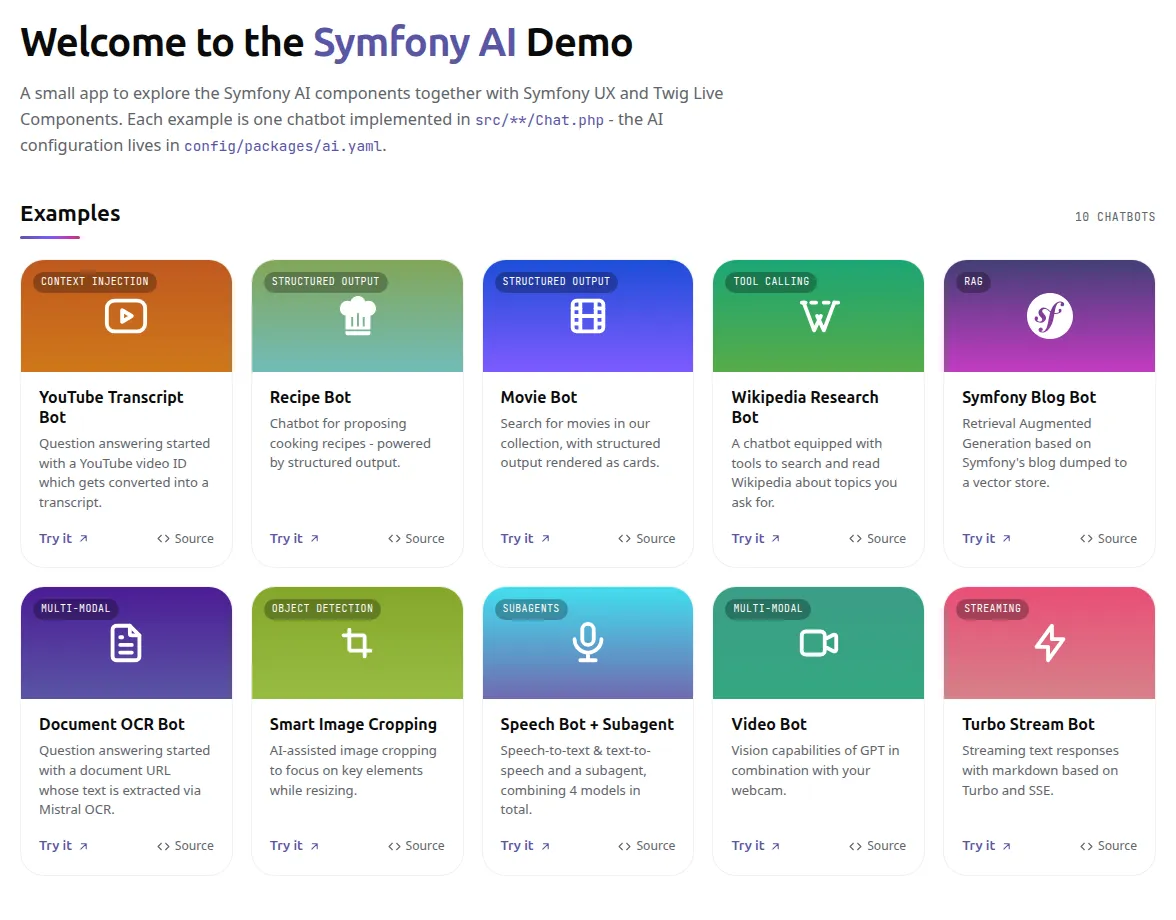
The Symfony AI demo is a fork of symfony/ai-demo where every chat use case runs through amazee.ai: YouTube transcripts, recipes and movies with structured output, Wikipedia, MCP, a video with image vision, Turbo Streams, and a RAG chatbot over the Symfony blog. That last one uses the gateway for the embeddings and the amazee.ai vector database as the store.
From an empty directory to a running chat:
git clone https://github.com/amazeeio-demos/symfony-ai-demo.git
cd symfony-ai-demo
composer install

# Sends a code to your email, then writes the LLM and vector database credentials to .env.local
php bin/console ai:amazee:configure you@example.com

# Index the Symfony blog into the amazee.ai vector database
php bin/console ai:store:setup ai.store.postgres.symfony_blog
php bin/console ai:store:index blog -vv

symfony serve -d
The wiring lives in config/packages/ai.yaml:
ai:
  platform:
    amazeeai:
      base_url: '%env(AMAZEEAI_LLM_API_URL)%'
      api_key: '%env(AMAZEEAI_LLM_KEY)%'
  agent:
    blog:
      platform: 'ai.platform.amazeeai'
      model: 'chat'
  store:
    postgres:
      symfony_blog:
        dsn: '%env(AMAZEEAI_VDB_DSN)%'
        username: '%env(AMAZEEAI_VDB_USER)%'
        password: '%env(AMAZEEAI_VDB_PASSWORD)%'
The agents use model aliases (chat, chat_with_complex_json, chat_with_image_vision, embeddings) that amazee.ai resolves in each region, so the demo works whichever region you pick.
Any model your key has access to can replace them, it is one line per agent.
One thing to keep in mind with RAG: the vector table is created with vector_size: 1024, the dimension of the embeddings alias.
If you switch to another embedding model, update setup_options.vector_size, then drop, set up and index the store again.
The demo also has an end-to-end suite with Symfony Panther. It clicks through all eleven use cases and asserts the Symfony AI panel of the profiler for the very request the click triggered. Every test calls a real model, so it costs a little and is excluded from the default suite.
In your own project
composer require symfony/ai-bundle symfony/ai-amazee-ai-platform amazeeio/symfony-amazeeai-configure
php bin/console ai:amazee:configure you@example.com
Then declare the platform and your agents in config/packages/ai.yaml, as above.
If something is missing or could be smoother, issues and pull requests are welcome in the main Symfony AI repository.